 Profile HelpIntuit
ReFILE a T1 return
by Intuit• Updated 6 months ago
If you are an EFILE service provider, you can use ReFILE to send T1 amendments online, as per the CRA, for your clients. The ReFILE service lets you change the same lines that individual taxpayers can with the Change my Return service in My Account.
Here's additional information that'll help you ReFILE a T1 return:
Who can use ReFILE?
Preparers can use the ReFILE service if the following conditions apply:
- The initial return was filed online (EFILE)
- The initial return was assessed
- You have acquired a new sign-off of a revised T183 from client
What tax years does ReFILE support?
ReFILE is supported for 2022 tax years or later with the latest ProFile version.
More Questions?
- Please see the Frequently asked questions section at the bottom of this article for more information.
- You can also review the CRA EFILE for electronic filers page for additional information.
- More information about making amendments or adjustments to TP1 returns.
Prepare a Return for ReFILE
- Open ProFile.
- Open a T1 return that has already been filed online, and for which a CRA assessment has been received.
For recordkeeping purposes, we recommend saving the return as a new file, using the Save As… option from the File dropdown menu.
- Enter the new information needed for a ReFILE into the return. For example, a client has received an unexpected T4 showing additional income.
Complete a ReFILE Request Form
Watch our video on completing a T1 ReFile Request form or follow steps 1–5.
- Open a ReFile Request form.
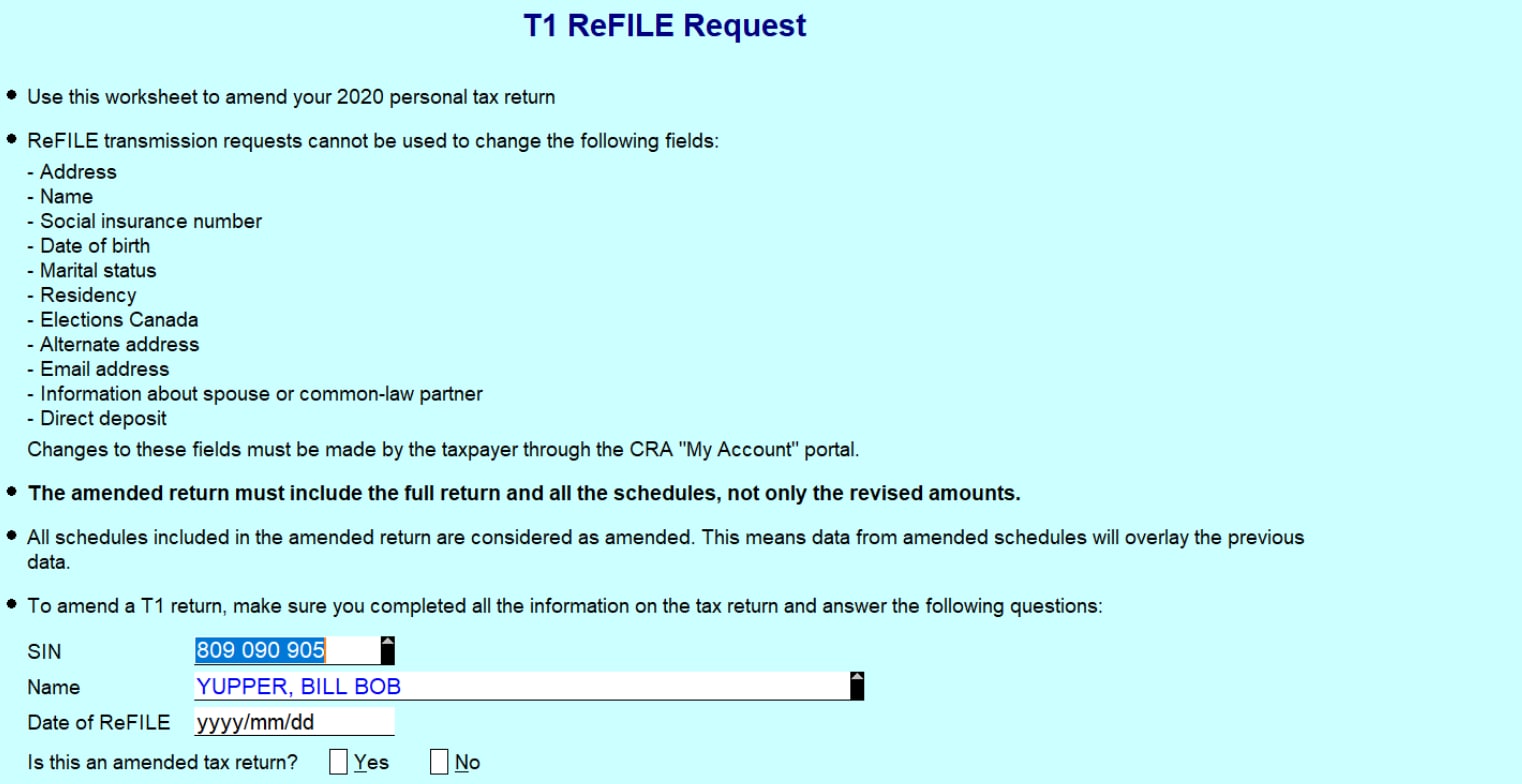
- Make sure the client's SIN and name are correct.

- Enter the current date in the Date of ReFILE field.

- Select the Yes option in the Is this an amended tax return? field.

Note: If you fail to select the Yes option, you'll get an error when attempting to Re-file.
- Answer the subsequent questions in the form. Note that in 2019 the question section in the image below was removed and replaced with a Notes section:
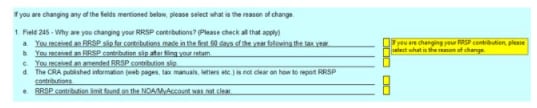
Important: These questions aren't required, and preparers don't have to answer them. You can disregard any notices about them.
Update the T183 Form
- Open the T183 Form used for the initial EFILE of the return:
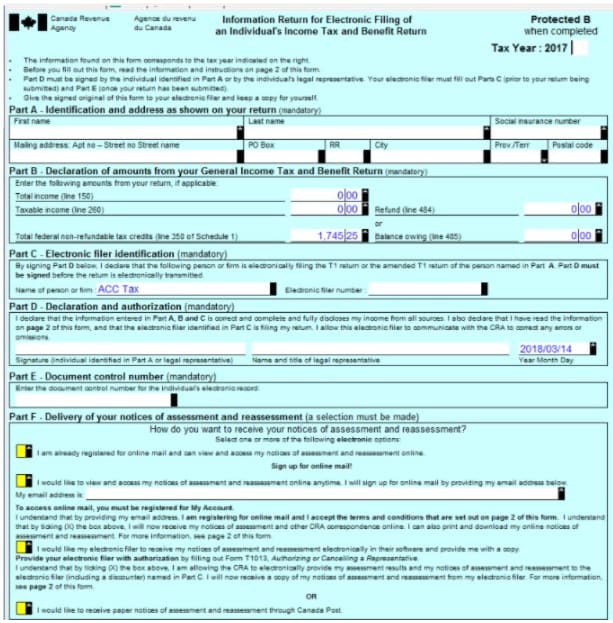
- Enter the preparer name (person or firm) and electronic filer number in section C:

A letter R now displays on the T183 form indicating the form was referenced for the ReFILE:

Important: This new designation is permanent and can't be rescinded from the form.
- Obtain a new sign-off from the client on the updated T183 form prior to ReFILE attempt.
ReFILE the Return
- Select EFILE and then EFILE/ReFILE this return…
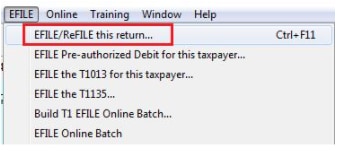
- The ReFILE process will start, and preparers will see a confirmation if it's successful.
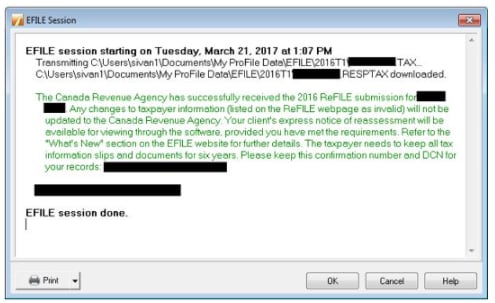
Confirm ReFILE
Confirm on the Return's Info page
The ReFILE confirmation number displays automatically on the Info form related to the return; it matches the number displayed in the ReFILE confirmation message.
The confirmation number is displayed in the T1 EFILE/ReFILE confirmation number field.
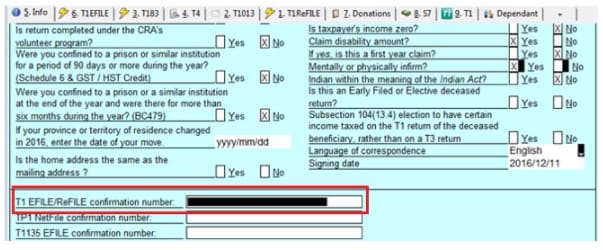
Confirm on the Return's Properties
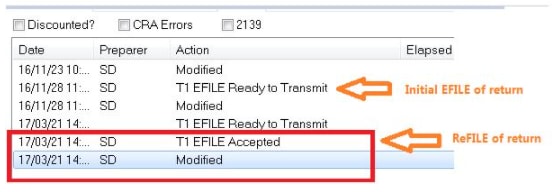
The ReFILE may be confirmed by examining the history of the return.
- Select the Properties option under the File dropdown.
- 2. Review the history of the return. The ReFILE displays as an EFILE Accepted with the date of the ReFILE displayed in the Date field.
Frequently asked questions
Does ReFILE submit only the new and/or updated information added to a return?
No. ReFILE will submit new or updated info, and resubmit any existing info from the return's original EFILE transmission.
Can I use ReFILE for a return after the filing deadline has passed?
Yes, the CRA will accept a ReFILE after the filing deadline.
Is ReFILE available for Quebec returns?
The ReFILE or amendment of a TP1 return is a ProFile feature now available; the form TP1FC is available in our 2019.4.0 release and later.
Can preparers batch ReFILE returns?
Returns can undergo batch ReFILE only from Client Explorer.
Is it possible to get a summary of changes to a return that was ReFILED?
There's no ReFILE summary feature available. It's recommended that preparers save a copy of the original return that was e-filed and also the ReFILED return for comparison.
Can I use ReFILE for a paper filed return?
No. ReFILE on a paper return is not accepted by the CRA at this time. A T1 Adjustment would need to be paper filed.
Does the ReFILE status of a return display in Hub?
No, Hub does not currently display a ReFILE status.
How many times can I perform a ReFILE for an EFILED return?
The CRA will accept multiple ReFILE submissions for any single e-filed return. However, the online system accepts only nine readjustments per tax year for each taxpayer, whether the taxpayer, preparer, or the CRA initiates the adjustments.
If the limit is exceeded, users receive an automated response stating the limit has been reached. Users can make additional requests on paper, preferably using Form T1-ADJ, T1 Adjustment Request, and mail them to the CRA.
I'm getting an error from the CRA that my EFILED return has not yet been assessed. Does this mean I can't ReFILE?
You can't re-file until the CRA assesses the original return. To see the status of any e-filed returns, check your My Account on the CRA website. Re-file once the initial return has been assessed.
Where can I get more information about ReFILE?
You can visit the CRA's EFILE news and ReFILE pages for more information. It includes service exclusions and limitations, as well as restrictions on the use of personal information within the service.