 Profile HelpIntuit
Completing a T2 return for a Not-for-Profit Organization (NPO) in TurboTax Business Incorporated
by Intuit• Updated 1 year ago
A non-profit may have to complete a T2 return in TurboTax Business Incorporated, and may have to complete a T1044 form.
CRA provides a T4177 income tax guide to completing the NPO information return.
A not-for-profit may also be exempt from federal income tax as a NPO within the means of section 149.
Completing a T2 return for an NPO
1. Open the T2 return.
2. Navigate to the Info page of the T2 return.
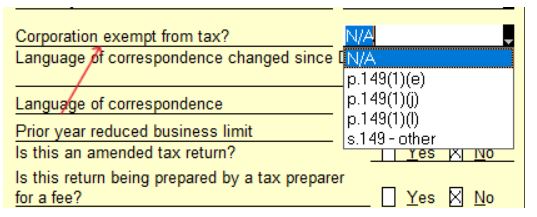
3. Select the applicable option from the drop-down menu for the question Corporation exempt from tax?:
4. Set the tax payable to "nil".
Note: If selecting option 149(1)(t), indicate on T2 line 370 how much income is exempt.
Completing a T1044 for an NPO
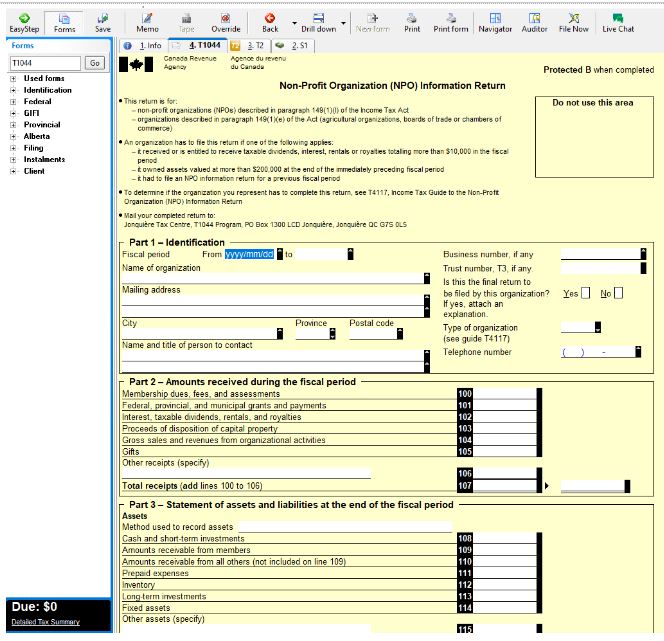
You may be required to fill out a T1044 for your NPO.
TTBInc includes the T1044 form:
More like this
- What are the differences between a non-profit (NPO) and registered charity return?by Intuit
- TurboTax Business Incorporated: How do I buy additional T2 returns?by Intuit
- TurboTax Business Incorporated: Is my corporation eligible to file using the CRA's Corporation Internet Filing system?by Intuit
- Resolving activation errors in TurboTax Business Incorporatedby Intuit