
Note: Troubleshooting methods for an EFILE error code may vary depending on the tax year. Commencing with the 2019 tax return, the CRA has renumbered several line items, and error messages may not be relevant for the tax year you are working on.
Review Chapter 2 of the CRA guide to see the latest error messages.
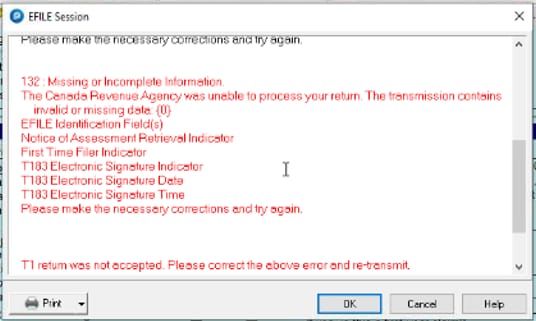
Error 132 occurs when there is missing or incorrect information on the return. Review the following items and ensure the necessary information is present and accurate:
- EFILE ID and password are correct
- NOA retrieval
- T183 is properly filled out
Error 99173
EFILE error 99173 is generally due to a missing or invalid element in the return. The error will, however, always list the cause in the first line:

Causes may include:
- SIN not entered or invalid, including non-resident spouses. In this instance, enter SIN #000000000 for the non-resident spouse
- Preparer information has been entered incorrectly
- Missing EFILE number and/or invalid password
If the return is EFILE-restricted and the reason for error 99173 is related to this restriction, ignore this error, as you're paper filing anyway.
SFD/NAICS codes error
This error is usually caused by an incomplete T2042, T2125, T2121 or T1164 in either the taxpayer or spousal return.
Note: In the case of Invalid Schema displaying the auditor, the root cause is that the return has too much data. This fails the schema validation as there are more than 100 entries in one particular section. According to the CRA this return would not be eligible for EFILE, and would need to be filed via paper filing.
Review the article EFILE error 99173: Tax Shelter number or NAICS element is invalid for more information on NAICS issues.
Other common EFILE errors
When trying to EFILE the T1 return, the transmission dialogue window displays Failed and are no arrow or plus signs that usually display in the left-side of the fail message. Review the file path under EFILE > Options > T1 > Common.
Failed message without an explanation
Review the Info page to ensure that the option for EFILE this return? has been selected. Confirm the specified EFILE addresses under EFILE > Options.
Invalid character in a free format area
The error code number indicates where the error is; for example, EFILE#36699. This indicates that line 6699 (on form T2017) is causing the issue. In this case, the amount in the field cannot be a negative number.