 Profile HelpIntuit
Request a reconfiguration after updating ProFile to the latest version
by Intuit• Updated 5 months ago
About C++ library updates
ProFile version 2018.0.2 automatically installs new versions of Microsoft C++ libraries for customers. These updates are required for users to access new features in ProFile and improve performance.
Configuration request
Users may encounter the following reconfiguration request:
ProFile requires a quick reconfiguration. You will not be able to use ProFile until this reconfiguration is complete. Click Yes if you wish to proceed. Click No to cancel.
What causes this reconfiguration request?
If the C++ library install process is interrupted (e.g. a network issue) or a C++ library is being used by another application on the user’s computer at the time of the ProFile installation, the download of the library will be incomplete and an error will be encountered upon starting or using ProFile after updating.
What needs to be installed if an error is encountered?
ProFile users need to install up to three new versions of C++ libraries.
The following are examples of C++ libraries that may require installation:
- C++ 2010 (x86) Version 10.0.40219
- C++ 2012 (x86) Version 11.061030
- C++ 2013 (x86) Version 12.0.30501
How to install new C++ versions
- 1. Select Yes after the error message displays. The reconfiguration process starts. Users will see up to three update windows with requests to Repair.
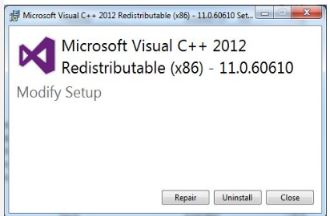
- Select Repair for each request. The installation will complete.
- Close and restart ProFile after all updates are made.
Note: If ProFile is a workstation install, apply fixes to both the server and individual PCs.
UAC Errors
If a ProFile customer encounters UAC errors during the redistributable update, accept by selecting OK on any related prompts.
Additional installation scenarios and fixes
If the above solution is not successful, try the steps below.
- Close ProFile
- Download the gpsetup.exe file from the ProFile download page.
- Run the new gpsetup.exe file; the C++ library install process begins.
- Go through all the steps. The necessary C++ libraries will download.
- Close and restart ProFile.
Note: If the issue still persists, uninstall and reinstall ProFile.
- A VC2010 issue affects DynamicPDF.
- A VC2012 issue affects the WPF Dialog (e.g., FeedbackSurvey, ProFileDialogFactory).
- A VC2013 issue affects the Chromium browser (e.g., any new web feature).