 Profile HelpIntuit
Migrating to ProFile or Pro Tax from Turbo Tax Business Incorporated
by Intuit•1• Updated 1 year ago
If a return requires a form unavailable in TTBinc but is available in ProFile or Pro Tax (for example, T661), you can use ProFile or Pro Tax. If you have already started the return, you can migrate your file over to ProFile or import it to Pro Tax and continue working.
To get started, go to the directory of the return by using Windows File Explorer.
(The default directory for this is C:\Users\USERNAME\Documents\My ProFile Data\T2 Return).
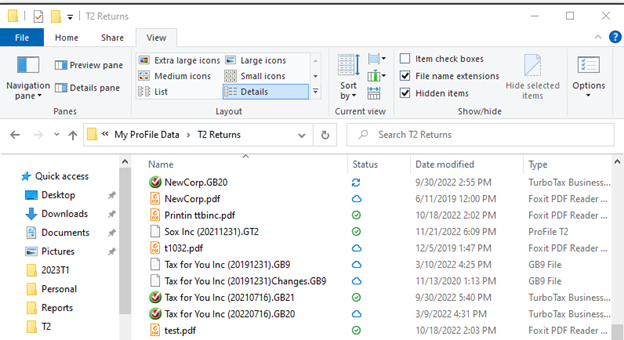
Windows 10: Select View in the toolbar of your file explorer, and select the checkbox for File Name Extensions.
Windows 11: Select View in the toolbar of your file explorer, select View, followed by Show. In the next dropdown menu, select File Name Extensions.
Note: Make sure that you make a copy of the file you would like to migrate to ProFile, as doing so is irreversible for the file used. To do so, right-click the file of the previous return, select copy, and paste the file to another location.
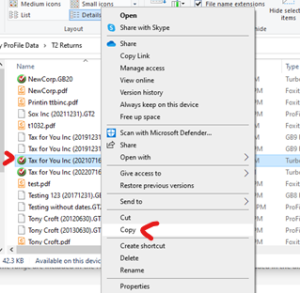
Go to the location of the copied return file. The file will now have an extension. The extensions are typically .GB22, .GB21, .GB20, .GB19, and so on. For this file to open in ProFile, it must have the file extension of .GT2.
Right-click the file, and select Rename. (rename icon for Windows 11 users). Highlight the extension of the file, and delete everything after the dot. Then, add GT2 as the extension for the file.

Once the file extension is changed to .GT2, it opens in ProFile.
You will need to purchase a OnePay or a license to file your T2 return in ProFile. If you need a refund for your Turbo Tax product please see this article.
More like this
- Turbo Tax Business Incorporated error “Failed to initiate transaction” when trying to EFILEby Intuit
- How to install Turbo Tax Business Incorporatedby Intuit
- Turbo Tax Business Incorporated "Feature transfer error (CoreFiles)” errorby Intuit
- Turbo Tax Business Incorporated requests an authorization codeby Intuit