 Profile HelpIntuit
EFILE Hard Block Errors
by Intuit• Updated 7 months ago
The CRA has made a requirement to block EFILE transmissions for a list of specific errors. This only impacts T1 returns at this time, and returns can't be EFILEd without the rectifying the errors.
Important: You won't be able to override these specific errors. These errors are subject to change, so this article won't provide you with an extensive list of all the errors. Instead, it'll tell you what those errors look like in ProFile.
Prior to this change, a user could submit the return via EFILE when these errors were present, but transmission would fail. This led to an increase in calls to the CRA, as well as customer confusion.
When using the ProFile Auditor, you will see the following:
CRA EFILE Blocking Error #xxxxx.
These errors are weighted for prioritization and will always appear at the top of the Auditor.

Should a user attempt to EFILE a return without clearing these Hard Block Errors, the Transmit now and Transmit later options will be deactivated.
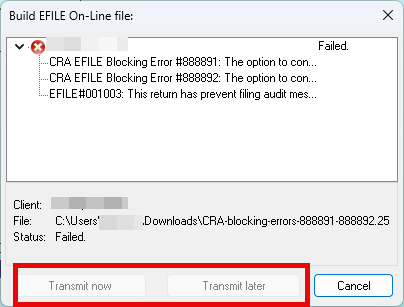
If you don't see the CRA EFILE Blocking Error message in the Summary tab, do the following:
- Go to Options > Environment > Audit > Summary Tab Includes section.
- Checkmark the “CRA EFILE Blocking Errors” option (it’s located at the bottom of the list).
Need help with these errors? Contact the CRA directly.