- The automatic expense allocation method minimizes tax for beneficiaries
- Or choose from a variety of methods like equal, percentage, or fixed amount allocation

Key Features
- Switch ProFile between computers using one license at no additional cost
- Simply suspend your licence on your desktop and activate it on a laptop to meet with clients in the field
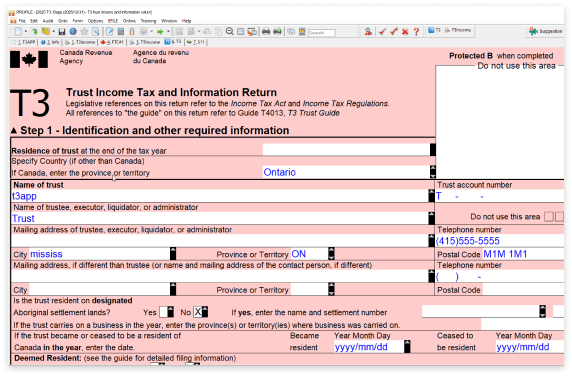
- Over 130 CRA and provincial forms, T3 tax slips and worksheets
- T3 federal, TP-646 Québec, and other special trust returns
- Trust income statements: T5Income, T3Income, and T5013Income forms to accurately report investment and partnership income within a trust return.
File multiple returns in one session using batch processing
Note: CRA requires EFILE registration
- All prior years are included free
- View multiple returns on one screen
- Access historical returns without having to install anything extra
- Get technical phone & chat support from our ProFile experts here in Canada1
- Access a variety of self-serve support options including FAQs, User Guide, in-product live chat, free training videos, and webinars
You’re kept up to date by notifications in ProFile about the latest CRA news, form amendments, and product updates
- Potential errors are highlighted with a yellow background in real-time
- The built-in auditor classifies mistakes by how serious they are for faster reviewing
- Detailed explanations of how to correct some errors means you’re not left in the dark
- Manage common tasks for multiple clients in one click and preview details without opening up the return
- Search by client or by situation, create and save custom searches
Save time & optimize trust returns
Flexible enough for all income allocation needs
Don't worry about running through various scenarios and tax calculations. Optimize trust returns with automatic expense allocation or simply select from the various allocation methods to save time. Choose from:
- Automatically allocate expenses
- Equal
- Percentage
- Fixed amount

To be on top of your game, you need ProFile.
More features you’ll love
Use the variance analysis tool to track and evaluate potential changes to a return from last year and/or adjustments to this year so you can plan better.
ProFile monitors several key fields in the client file by default. You can observe the totals for these fields change while working on different forms. Select the fields you want to monitor and watch them change as you work.
ProFile's built-in Active Auditor flags errors, omissions, dates & notices – and compiles them into a list with a detailed explanation of how to correct the problem.
Scroll through the list and then jump to the corresponding form and field. View the Auditor as a summary or focus on a specific type of issue (warnings, memos, etc.).
Flag items in the return as you go with Review Marks. Use standard reviewing and editing marks like partner sign-off, correction required, and question mark.
All marks are recorded within ProFile's Active Auditor, for a smoother review process.
Memos are great for adding notes and reminders directly in a tax return. Tapes are handy for making and recording quick calculations in a field.
Review them both using the Active Auditor for a final check.
Attach multiple documents to a form or field of a return using HyperDocs.
Formats include: Excel, Word, PDF, JPEG, and TIFF.
Save some hassle and paper by converting your returns into password-protected PDFs to email them to your clients.
Create professional mailing labels, engagement letters, and general client correspondence with information right from the personal tax return you're working on.
Create and save customizable settings per computer, per user, or set global settings across a network that everyone can access through ProFile using Options Administration.
Use the variance analysis tool to track and evaluate potential changes to a return from last year and/or adjustments to this year so you can plan better.
ProFile monitors several key fields in the client file by default. You can observe the totals for these fields change while working on different forms. Select the fields you want to monitor and watch them change as you work.
ProFile's built-in Active Auditor flags errors, omissions, dates & notices – and compiles them into a list with a detailed explanation of how to correct the problem.
Scroll through the list and then jump to the corresponding form and field. View the Auditor as a summary or focus on a specific type of issue (warnings, memos, etc.).
Flag items in the return as you go with Review Marks. Use standard reviewing and editing marks like partner sign-off, correction required, and question mark.
All marks are recorded within ProFile's Active Auditor, for a smoother review process.
Memos are great for adding notes and reminders directly in a tax return. Tapes are handy for making and recording quick calculations in a field.
Review them both using the Active Auditor for a final check.
Attach multiple documents to a form or field of a return using HyperDocs.
Formats include: Excel, Word, PDF, JPEG, and TIFF.
Save some hassle and paper by converting your returns into password-protected PDFs to email them to your clients.
Create professional mailing labels, engagement letters, and general client correspondence with information right from the personal tax return you're working on.
Create and save customizable settings per computer, per user, or set global settings across a network that everyone can access through ProFile using Options Administration.
- 1: Intuit reserves the right to limit the length of a given call or the number of calls from a given customer.
- Terms, conditions, pricing, special features, and service and support options subject to change without notice.
Call sales: 1-844-861-3600
